


A common mistake that many Amazon sellers make is buying VAT free products and then listing them incorrectly. If the product is VAT free in the UK, you must also ensure that it is listed correctly in Seller Central. If you do not, Amazon will treat the item as a standard rated product and you will be charged VAT on your sale price. This reduces your margin and misrepresents your VAT records.
VAT free products include:
- Coffee beans and ground coffee
- Tea (not iced tea or flavoured syrups)
- Most essential food items
- Certain health food staples
- Some baby and infant nutritional products
There are many more, but the main point is this: if the item is zero rated for VAT in the UK, you must set it as zero rated in Seller Central when you list it.
How to List VAT-Free Products Correctly in Seller Central
Follow these steps:
- Go to Amazon Seller Central.
- Search for and add the product you are going to sell as normal.
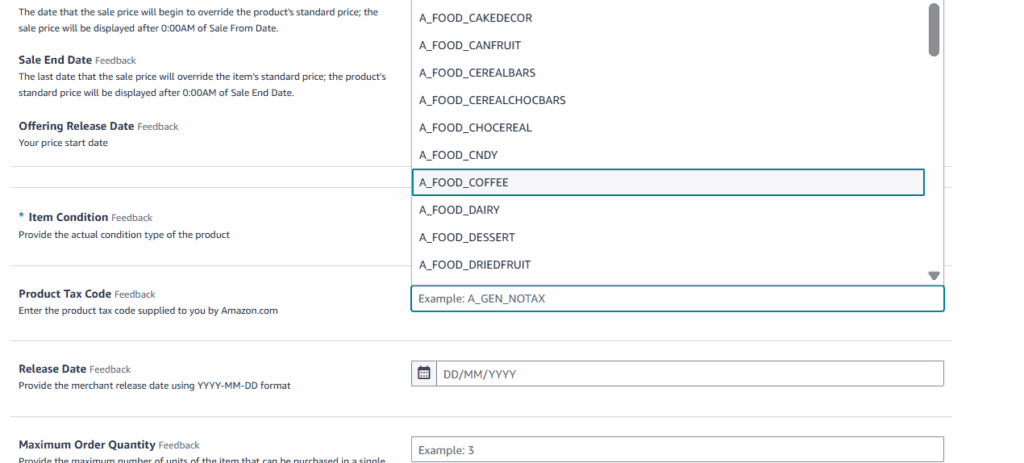
- When you get to the listing details page, scroll to Product Tax Code.
- Click on Product Tax Code to open the selection menu.
- Select the correct tax code for your product.
For coffee, for example, use A_FOOD_COFFEE.
- Save and submit the listing.
This ensures that Amazon recognises the product as a zero rated item and therefore does not apply VAT to the sale.
Recording VAT Free Products in Your COGS
When adding your product costs into your accounting or sourcing tools, make sure you also mark the VAT correctly.
For example, in Seller Toolkit:
- Enter your cost price as usual.
- Set VAT Rate: 0%.
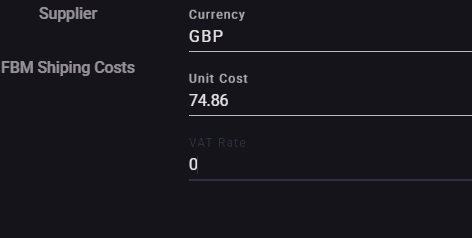
This ensures your profit calculations remain accurate.
If you are using Xero paired with Link My Books, make sure the product cost categories are set to zero rated, but the link with Amazon should do this. Your accountant can help you with this if needed.
Why This Matters
If you do not list VAT free products correctly:
- Your margin will appear lower than it should be.
- Your VAT return figures will be incorrect.
- You could end up claiming or paying the wrong amount during VAT submissions.
A simple adjustment in the product tax code prevents all of this.

Final Thoughts
Listing VAT free products correctly is a small but crucial step. If a product is zero rated for VAT in the UK, you need to ensure:
- The product tax code is set correctly in Seller Central.
- Your cost on your tracking software reflect 0% VAT.
- Your accounting software is consistent with your inventory data.
It only takes a few seconds to do, but it protects your margins, keeps your books accurate, and prevents VAT complications later.


