
If you want to know how to get ungated on Amazon UK, you’re in the right place. If you’ve been selling for more than about five minutes, you’ve probably run into a product you wanted to sell and been hit with that lovely “Request Approval” message. Welcome to the world of ungating — and honestly, it’s one of the most common things I get asked about from newer sellers.
I’ve been through the ungating process more times than I can count over the past few years, and I’ve gone from finding it frustrating to honestly just seeing it as part of the game. Once you understand how it works and what Amazon actually wants from you, it becomes a lot less scary.
This guide covers everything — the basics of how ungating works, what documents you need, the new 100-unit requirement that’s caught a lot of people off guard, and some legitimate tricks that can save you time and money.
I remember back when I first started doing Amazon, ungating was easy. It only took 2-3 attempts to get ungated. However, times have changed. I remember having this one brand, Lenovo — this was my nemesis brand. It took me 7 attempts to ungate despite the fact I had an invoice from Lenovo’s business website. Ah, how times have changed.
Now 7 attempts is rookie numbers. These days it can take 20-30, even 50+ attempts sometimes to get a premium brand ungated.
I think once you understand how Amazon works and how the ungating process works, you come to accept the way that it is. Ungating becomes — not easy — but fairly regular, and you know what you have to go through sometimes to get ungated.
Table of Contents
What Is Ungating and Why Does Amazon Do It?
So basically, “ungating” is the process of getting Amazon’s permission to sell in certain restricted categories or brands. Categories like health and beauty, grocery, and topicals are gated, and big brands like Nike, Versace, Clinique, Bosch, Samsung, and loads of others require approval before you can list anything.
Amazon does this for a few reasons. They want to make sure the products being sold are genuine, they want to protect customers from dodgy sellers flooding listings with counterfeit gear, and they want to maintain some level of quality control. To be fair, it makes sense — even if it’s annoying when you’re the one trying to get approved.
The good news is that once you’re ungated in a brand or category, you stay ungated. It’s a one-time process per brand or category, and it opens up a whole world of products that most sellers can’t touch. That reduced competition is actually one of the biggest advantages of going through the hassle.
What Amazon Requires for Ungating
Before you start submitting anything, you need to understand exactly what Amazon is looking for. Get this wrong and you’ll waste time with rejections — and trust me, I’ve seen people submit the same incorrect documents 20 times wondering why they keep getting declined.
Here’s what Amazon typically requires:
A proper invoice. This is the big one. Amazon wants a purchase invoice — not a receipt, not an order confirmation, not a pro-forma invoice. An actual invoice from a recognised distributor, wholesaler, or retailer. The invoice needs to clearly show the product name, quantities, the supplier’s name and address, and your billing address.
Your billing address must match your Seller Central address. This trips up more people than you’d think. The address on your invoice needs to match the business address on your Amazon seller account. Ideally they should match identically, including spacing and formatting, because Amazon’s bots sometimes auto-decline applications where there are minor differences.
A minimum of 10 units. For most brands and categories, you need to show you’ve purchased at least 10 units. If you’re using an Amazon-to-Amazon invoice, that minimum goes up to 50 units. Some bigger brands now require 100 units (more on that below).
The invoice must be dated within the last 180 days. Don’t try submitting an old invoice from a year ago — Amazon won’t accept it.
Multiple invoices can be combined. You don’t need all 10 (or 50 or 100) units on a single invoice. You can combine multiple invoices as long as the total adds up to the required amount.
A big tip that I can give you as well is to almost overwhelm Amazon with evidence. This means giving them a photo of the actual items in your possession, a screenshot of your bank statement showing the transaction for the ungate, and any other evidence you can provide for the Amazon employee. You could even supply a screenshot of the Companies House page for the company you bought it from to show it’s a legitimate supplier.
How to Get Ungated on Amazon UK: Step-by-Step
Right, here’s how you actually get ungated on Amazon UK:
Step 1: Check if you can auto-ungate first. Before buying anything, go to Seller Central, navigate to Inventory → Add a Product, search for the product you want to sell, and click “Request Approval.” Sometimes Amazon will just let you through without any documents. This happens more often than you’d expect, especially if your account has decent metrics and some sales history. Always try this first — it costs nothing.
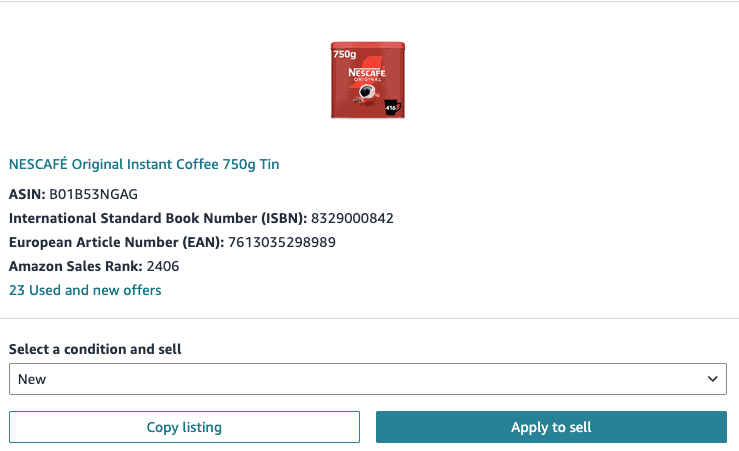
While I am a huge fan of SellerAmp and other tools, do not use these to try and request approval, you are actually hurting yourself by missing out on auto-ungates.
Step 2: If auto-ungating fails, you’ll see “Submit Documents.” This is where you need the invoice. Don’t panic — this is completely normal and it’s just part of the process.
Step 3: Source your products from a recognised supplier. Purchase your units from a legitimate distributor, wholesaler, or recognised retailer. Make sure the supplier provides proper invoices. If you’re unsure whether a website offers proper invoices, tools like OA Hero have an extensive database that tells you which sites provide invoices suitable for ungating.
Step 4: Upload your invoice and submit. Follow the prompts in Seller Central to upload your documents. Make sure everything is clear and legible.
Step 5: Wait — then follow up. After submitting, monitor your email and Seller Central notifications. If Amazon requests additional information, respond promptly.
Step 6: If rejected, resubmit. This is where most people give up, and honestly, it’s the biggest mistake. If you get rejected, reply to the same case (do not create a new case) and resubmit your documents. I’ve had ungating requests take anywhere from 1 to 20+ attempts before getting approved. Oftentimes you’re submitting the exact same information over and over until it lands on the right person’s desk.
If you have no luck after about 50 attempts, close the case, wait seven days, and try again on a different ASIN within the same brand. Make sure you’re meeting all the requirements I’ve mentioned in this guide before resubmitting though — there’s no point hammering the same case if your documents aren’t right.
You cannot take no for an answer with ungating. Persistence is genuinely the most important part of the whole process.
Typically for me these days it takes around 10-20 attempts to ungate a brand, the last one I did was Tommy Hilfiger and it took me around 12 attempts.
The Trick Most People Don’t Know About
Here’s something that saves newer sellers a fortune, and it’s completely legitimate. You don’t need to purchase the exact item you’re trying to ungate — it just needs to be from the same brand.
So for example, if you want to sell a Nintendo Switch console but that’s obviously expensive to buy 10 of just for ungating, you could buy 10 Nintendo-branded sticker packs for a few quid each instead. Submit that invoice, get ungated in the Nintendo brand, and then you’re free to sell the Switch or anything else under Nintendo’s brand.
This works across the board. Want to ungate in Oral-B? You don’t need to buy 10 electric toothbrushes — buy 10 packs of replacement heads from a recognised supplier instead. The point is to prove you can source genuine branded products from legitimate suppliers, not that you can afford to stockpile the most expensive item in the brand.
It is what it is — Amazon just wants the paperwork to be right. Play the game smart and you’ll save yourself a lot of money.
Why Amazon Keeps Rejecting Your Ungating Requests
Honestly, you won’t like the answer here, but I will tell you anyway. Amazon customer service for sellers is one of the worst on the planet. When it comes to ungating, you are either being reviewed by a bot or by a virtual assistant in the Philippines.
Amazon has recently been using more and more bots to review ungating requests. Even one slight detail or issue with the invoice and they will reject it. It could be something as simple as your name on the invoice is Apple LTD, but on your Seller Central it’s Apple ltd.
If you are not being reviewed by a bot then you are being reviewed by a human in the Philippines (or similar). Often times these virtual assistants do not care about you or doing their job correctly. Their goal is to keep Amazon’s KPIs up and they have to review x number of ungates in a certain time period, or they only have 10-20 seconds per ungate request to review all the information.
This means they will often select any random reason for rejection, and honestly they are never wrong for declining an ungate request, but they can get in trouble if they approve one incorrectly. This is the system Amazon has set up and it’s essentially being exploited by the Amazon employees.
This is why we tell you that you need to keep trying. It’s essentially a lottery in order to get ungated on Amazon UK. No joke.
The 100-Unit Ungating Requirement (2026 Update)
You may have noticed recently that a lot of bigger, well-known brands now require 100 units to get ungated on Amazon UK. Brands like Bosch, Samsung, and other major names are no longer 10 units, which at first feels like bad news — especially for newer sellers working with limited capital.
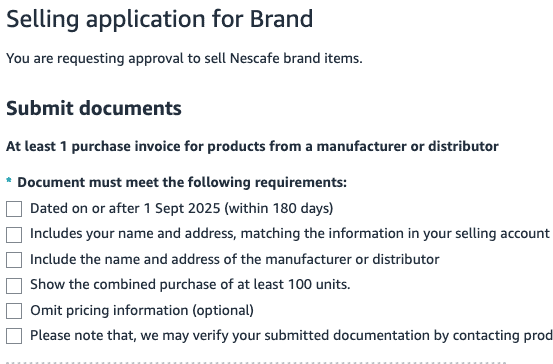
Committing to 100 units can sound expensive, but when you zoom out and look at the bigger picture, this shift actually creates opportunity rather than removing it.
Why Amazon Has Moved to 100 Units
Amazon is clearly trying to filter out sellers who jump onto big brands, flood listings, and tank prices — which leads to poor customer experiences and messy listings. By raising the barrier to entry, Amazon is forcing sellers to be more serious, which naturally reduces competition and improves listing stability.
I have actually noticed fewer sellers on some of the bigger brands these days and it’s wonderful. During Christmas 2025 I was on quite a few premium fragrance listings where there was far less competition because the 100-unit ungate is a huge barrier to entry.
I totally understand that when you’re new and have a limited budget, the idea of spending £1,000 or more to ungate a brand like Paco Rabanne can seem impossible. All I can say to that is you will get there eventually. You need to start with the millions of other brands that are easier to sell, keep building your capital and your business, and you will get there. Remember, Amazon is a serious business that can be life changing, but no one ever said (or they shouldn’t have) that it’s easy or fast.
Why This Is Actually Good News
The real upside of 100-unit ungates is reduced competition. When fewer sellers can get approved, listings stay healthier, prices hold better, and you’re not constantly competing with dozens of sellers racing each other to the bottom. This creates a more predictable and profitable environment, which is far more valuable long term than easy ungates that everyone piles onto and ruins.
100 Units Doesn’t Always Mean Massive Money
A lot of people assume 100 units automatically means a massive spend, but that’s not always true — and this is where the trick I mentioned earlier becomes even more valuable.
Many big brands sell smaller accessories, consumables, or low-cost items under the same brand name. Instead of buying 100 units of a £50 product, look for branded items that cost a few quid each. You might spend £200-300 getting ungated in a brand where the products you actually want to sell have 40-50% ROI and much less competition.
Think of it as an investment. You’re unlocking access to strong, reputable brands that can generate profit long term. The upfront cost pays for itself pretty quickly when you’re selling in a healthier market with fewer competitors.
Don’t Ungate Brands Just for the Sake of It
This is a mistake I see all the time, especially with newer sellers. They get it in their head that they need to ungate as many brands as possible, so they go on this mad ungating spree — spending money on invoices for brands they have no intention of actually selling.
Don’t do that. Only ungate a brand when you’ve found a specific deal that makes money. If you’ve found a product on Keepa that looks profitable, the margins stack up, the competition is reasonable, and the only thing stopping you is that the brand is gated — that’s when you ungate. Not before.
There’s no point spending £200 ungating Samsung if you haven’t actually found a Samsung product worth selling. You’re just tying up capital for no reason.
The way I do it is simple. I find the deal first, check everything looks good, and if the brand is gated, I go through the ungating process. The deal is what drives the decision, not some checklist of brands I want to be ungated in.
Where to Source Products for Ungating
This is where people often get stuck. You need invoices from recognised suppliers, but if you’re new, you might not have wholesale accounts yet. Here are some options:
Wholesale platforms like Qogita. Qogita provides proper VAT invoices that Amazon accepts for ungating purposes, and the minimum order quantities are much lower than traditional wholesalers. I’ve used Qogita invoices for ungating and it works well. You can read my Qogita review here for a full breakdown of how it works.
Brand websites directly. Amazon has been accepting purchase invoices from brand manufacturer websites. So if you want to ungate Nike, buying directly from Nike.com and using that invoice has been working. This doesn’t always work, but it’s currently a valid method.
UK wholesalers and distributors. The traditional route. Open an account with a wholesaler, purchase your units, and use their invoice. This takes more effort upfront but gives you a reliable sourcing relationship going forward.
Ask other sellers. Before ungating a brand, ask other sellers in communities like my Discord which sites they’ve used successfully. Certain retailers are known for having higher acceptance rates on Amazon.
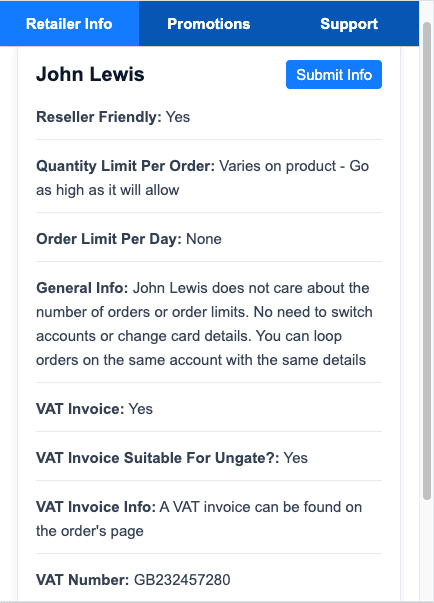
Depending on what you’re selling, some of the best places to get invoices for ungating from are HarrisonsDirect, ScrewFix, or even retailers like John Lewis.
Tools That Help With Ungating
OA Hero is genuinely useful here to get ungated on Amazon UK. It has an extensive database of websites that tells you whether they offer proper invoices, which brands you can ungate from which suppliers, and a whole load of other information that saves you time. I built OA Hero partly because I was fed up of the trial and error involved in figuring out which sites work for ungating.
Beyond that, Keepa is essential for checking whether the products you’re buying for ungating purposes will actually sell afterwards. There’s no point ungating a brand if you can’t make money selling the products. Always check the Keepa graph and competition before committing money.
Common Mistakes to Avoid
Submitting receipts instead of invoices. This is the number one reason for rejections. A receipt from Tesco is not an invoice. Make sure whatever you submit is an actual invoice with your details, the supplier’s details, and VAT information.
Address mismatches. Even small differences between your invoice address and your Seller Central address can trigger auto-rejections. Double-check everything matches exactly.
Giving up too early. I cannot stress this enough. Ungating often takes multiple attempts. If you get rejected once or twice and give up, you’re leaving money on the table. The people who succeed at ungating are the ones who keep going.
Not checking what’s actually required. Different brands have different requirements. Some need 10 units, some need 50, some need 100. Always check the specific ungating page for the brand or category you’re targeting before buying anything.
Buying expensive products when cheap ones will do. As I covered above, you don’t need to buy the flagship product. Find the cheapest legitimate branded item and use that.
Final Thoughts
Ungating is one of those things that feels intimidating when you’re new but becomes second nature once you’ve done it a few times. The key is understanding what Amazon wants, getting your documents right, and being persistent when things don’t go through first time.
The shift to 100-unit requirements for bigger brands is actually a positive thing if you’re willing to play the long game — less competition, healthier listings, and better margins. Don’t let the upfront cost put you off. Get it in, get it done, and unlock access to products that most sellers can’t touch.
If you’ve got questions about ungating specific brands or categories, drop into my Discord community where you can ask other sellers who’ve been through the process. And if you want more hands-on help, you can always book a free discovery call to chat about mentoring.
Hopefully this article has given you a good understanding of the requirements of Amazon for ungating, but also the underlying mechanisms that are happening at Amazon and why you are getting rejected.
Don’t take it personally. Just accept this is a part of being an Amazon seller and focus your efforts on sourcing, buying and growing your business.