


In this third instalment of the Business Leaks mini series, we’re focusing on one of the most common and frustrating problems FBA sellers face – missing inventory during prep and shipping.
When you’re dealing with retailers, couriers, prep centres, and Amazon’s own warehouses, there’s a lot of moving parts, and things are bound to go missing from time to time. That’s just the nature of the beast.
But while we may not be able to avoid it entirely, we can manage it. We can minimise the losses. And more importantly, we can put systems in place to track and reclaim what’s rightfully ours.
In this post, we’re going to cover:
- Where your shipments can go missing
- Why your shipments go missing
- How to manage missing items from your prep centre
- How to manage missing items from Amazon
- Final thoughts and next steps

Where Your Shipments Can Go Missing
When running an Amazon FBA business, your products pass through multiple stages before they land in Amazon’s fulfilment centre. That means multiple opportunities for items to go missing.
Here’s where things can go wrong:
- With the retailer
- With the courier (from retailer to prep centre)
- At the prep centre
- With the courier (from prep centre to Amazon)
- At Amazon’s warehouse
Because your stock moves through so many hands, the risk of loss is high, and that’s why it’s essential to stay on top of everything.
This is where having a buy sheet becomes absolutely essential.
Create a spreadsheet that tracks:
- Product name
- ASIN
- Retailer
- Order number
- Date
With this in place, you can track your purchases. If anything goes missing, you’ll know exactly where to start looking — and you’ll have the data to back up your case, including tracking numbers (which are usually accessible through your emails).
Why Your Shipments Go Missing
There are several reasons your inventory might go missing, and they often differ depending on where in the process the issue occurs.
Some of the most common causes include:
- Retailers miscounting or short-shipping items
- Couriers splitting shipments without informing you — so you might only receive part of the order
- Prep centres misplacing stock or failing to check it in properly
- Shipments getting lost in transit with UPS or other logistics providers
- Amazon losing products once they arrive at the fulfilment centre
For example, I recently had an issue where a courier split a shipment and I only received four out of five items. It wasn’t the retailer’s fault, but rather the courier, which made it harder to trace.
Even if you haven’t had this happen yet, it’s highly likely it will at some point, which is why having your documentation and tracking systems in place is so important. If you need to open a case, you’ll be asked to provide this information quickly.
How to Manage Missing Items from Your Prep Centre
When stock goes missing at the prep centre stage, visibility is everything. Ideally, your prep centre should give you access to a proper tracking portal, not just a Google Sheet. A basic spreadsheet can work, but it’s easy for things to go unnoticed or unrecorded. You want a system that’s clear, reliable, and regularly updated.
Here’s how I manage this process:
- At the end of every month, I review all the stock that’s gone into my prep centre that month.
- I compare this with what I’ve ordered and what’s been booked in.
- Any discrepancies get flagged immediately.
- I contact the prep centre to chase missing stock.
In many cases, it turns out to be an issue on my side, such as a mislogged order, or it could be an issue from the retailer. But sometimes it is down to the prep centre misplacing or failing to check in items properly.
The key is to be vigilant. Don’t assume everything’s fine just because no one’s raised a red flag. Take responsibility for tracking your own stock and reconciling it regularly.
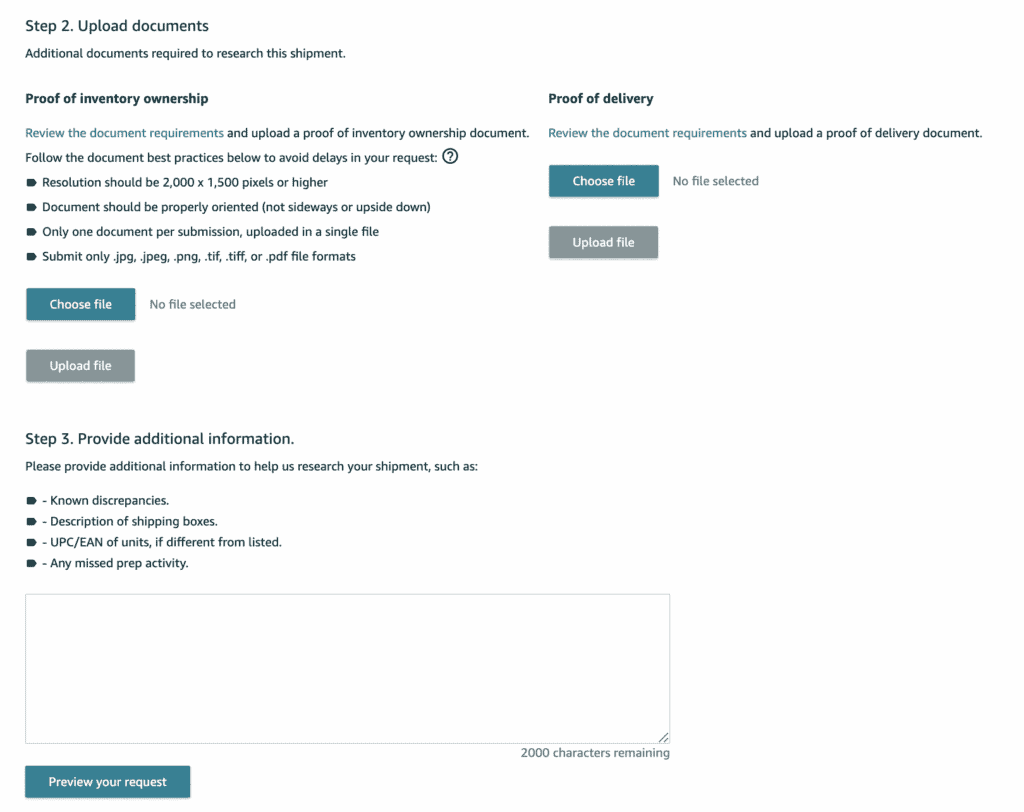
How to Manage Missing Items from Amazon
Missing items at Amazon’s warehouse are extremely common. Here’s how to deal with it:
- Go into your Amazon Seller Central account.
- Navigate to Inventory > Shipments.
- Look through all your closed shipments.
- For each shipment, check that all your units have been checked in.
- If any units are missing, open a case.
- Select the option: Research Missing Units.
- Submit your invoice as evidence for the missing items.
Once you’ve done this, log everything into a spreadsheet. You should record:
- The case ID
- The ASIN of the missing product
- The product title
- Quantity missing
This is important because if you don’t track these cases, you’ll lose sight of which shipments you’ve opened cases for, which ones need following up, and which ones were reimbursed.
Most of the time, Amazon will reimburse you in full, which is great, but again, you need to stay on top of it. This isn’t just an occasional business leak — it’s something that can seriously harm your cash flow if left unchecked.

Final Thoughts
There are software tools now being developed to track all of this automatically, from order to prep to shipment to reimbursement. I haven’t personally tested any of them yet, so I won’t name drop here. But it’s something I plan to explore going forward.
Missing items in transit is one of the most volatile and consistent business leaks in Amazon FBA. It happens all the time, daily, in some cases. It’s up to us as sellers to stay sharp, create systems, and protect our bottom line. This is the cost of running a logistics heavy business. But with vigilance and tracking, you can turn chaos into control.