

In this blog we are going to talk about your FBA in-stock rate and how it affects your Inventory Performance Index, also known as IPI.
Your IPI score is one of the most important metrics on your account. It directly affects how much stock Amazon allows you to send in and how your inventory is managed.
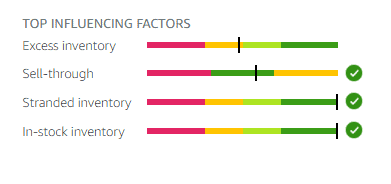
What Is the IPI Score
The IPI score is Amazon’s way of measuring how well you manage your inventory.

It looks at:
- Excess inventory
- Sell-through rate
- Stranded inventory
- FBA in-stock rate
Amazon wants sellers who:
- Keep stock moving
- Do not overstock
- Avoid stranded units
- Manage inventory properly
Why Your IPI Score Is Important
If your IPI score drops too low:
- Amazon limits how much stock you can send in
- You may struggle to scale
- Storage restrictions can be applied
- Growth becomes much harder
A strong IPI score gives you:
- Higher storage limits
- More freedom to scale
- Less stress around shipments
What Is FBA In-Stock Rate
Your FBA in-stock rate measures how often your products are available for sale.
Amazon wants:
- Products to stay in stock
- Consistent availability
- No long gaps where items are unavailable
If products go out of stock frequently, your in-stock rate drops.
Why This Is Hard for Arbitrage Sellers
For arbitrage sellers, this metric is difficult to keep high.
Why:
- You cannot always restock
- Deals dry up
- Prices change
- Suppliers sell out
- You often run out of stock permanently
Unlike private label sellers, you cannot reorder the same product whenever you want. Once it is gone, it is gone.
This naturally hurts your in-stock rate.
The Hack to Get Your In-Stock Rate to 100 Percent
There is a way to fix this.
This is the exact process.
- Go into Seller Central
- Click on Inventory Performance Index
- Click Go to IPI dashboard

- Scroll down to FBA in-stock rate
- Click Restock today
- Click Clear filters

- Select All products
- Click Hide recommendations

This removes all the old ASINs that you can no longer restock.
You are basically telling Amazon:
- These products are finished
- I cannot restock them
Why This Works
Amazon assumes you should be restocking everything. For arbitrage sellers, that is not realistic.
By hiding recommendations:
- Amazon stops expecting restocks
- Your in-stock rate improves
- Your IPI score increases
How Long It Takes
This is not instant.
You need to:
- Do this every couple of days
- Keep clearing recommendations
- Stay consistent
After a couple of weeks:
- Your in-stock rate will climb
- You can reach 100 percent
- Your IPI score will improve

Final Thoughts
This is an unknown hack when it comes to IPI score increases. Amazons IPI system is built for wholesale and private label sellers, not arbitrage. We have to adapt.
By clearing restock recommendations regularly:
- You protect your IPI score
- You avoid storage limits
- You keep your account healthy
Do this consistently and it will make a huge difference long term.