

In this blog, we are going to cover shipping items overseas, specifically Amazon EFN, and why disabling overseas shipping is often the right move, especially for newer sellers.
Amazon makes it very easy to sell internationally without realising it. While this can sound appealing, it can also create problems if you are not prepared for it.
What Is Amazon EFN
EFN stands for European Fulfilment Network. It allows Amazon to ship your stock stored in one country to customers in other countries.
For example, stock held in the UK can be shipped to customers in Europe if EFN is enabled.
Positives of Shipping Overseas
There are benefits to EFN if you are set up correctly:
- Increased customer reach
- More potential sales
- Better stock utilisation
- More sourcing opportunities
For experienced sellers with VAT registrations, proper compliance and good systems, EFN can be useful.
Negatives of Shipping Overseas
For many sellers, especially newer ones, EFN can cause serious issues.
Common problems include:
- Unexpected VAT liabilities
- Increased returns complexity
- Customer service issues across borders
- Longer delivery times
- Confusion around tax reporting
- Higher risk of account issues (IP, policy violations etc)
For new sellers, these risks usually outweigh the benefits. Until you fully understand VAT, compliance, and cross-border selling, shipping overseas is not recommended.
Why This Is Not Ideal for New Sellers
New sellers should focus on:
- One marketplace
- Simple fulfilment
- Clean account health
- Controlled risk
Adding overseas shipping introduces unnecessary complexity early on. Many sellers do not realise EFN is enabled by default, which can lead to accidental international sales.
Disabling it gives you control.
How to Disable Overseas Shipping
There are two ways to prevent overseas shipping and you need to use both.
Method 1: Disable EFN in Fulfilment by Amazon
This stops Amazon from offering your FBA stock to overseas customers.
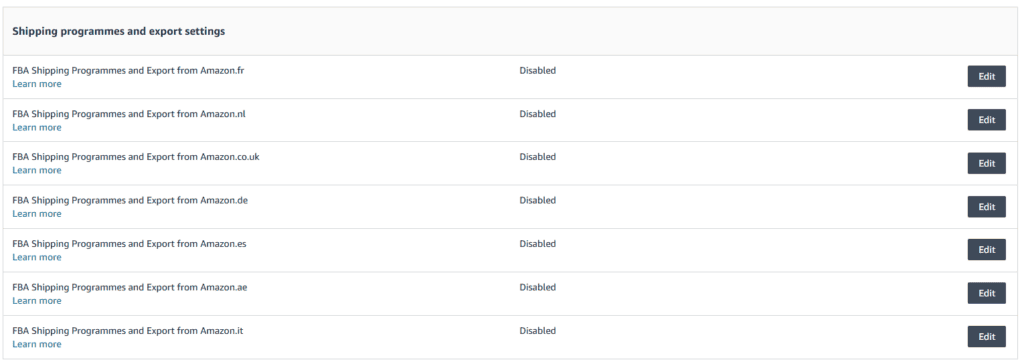
You will need to:
- Go into Seller Central
- Navigate to the cog icon
- Go into “Fulfilment By Amazon”
- Head to “Shipping programmes and export settings”
- Disable all countries (as shown in the image above).
Once disabled, your stock will only be sold in your primary marketplace.
Method 2: Activate Holiday Settings
Holiday settings can also be used to restrict where your listings are shown.

- Go into Seller Central
- Navigate to the cog icon
- Go into “Account Overview”
- Put each country on holiday apart from the UK
This acts as an additional safeguard and ensures Amazon does not automatically push listings to overseas marketplaces.

Final Thoughts
Shipping overseas can be beneficial in the right circumstances, but it is not suitable for everyone. For newer sellers, disabling EFN reduces risk, simplifies operations, and prevents compliance issues.
If you are unsure about VAT, international returns, or overseas tax rules, turning off overseas shipping is the sensible option.
Once your business grows and you are fully prepared, you can always enable it later.