


This is a business leak that I’ve only recently uncovered after digging deeper into my own inventory and analysing my out-of-stock items. It’s something I’ve never heard discussed before, and quite honestly, it’s poor on Amazon’s behalf.
Here’s the situation:
You send inventory to Amazon, it’s checked in, and you eventually sell out. But when you compare the number checked in against the number sold, the figures don’t match.
For example:
You send in 10 toothbrushes. Amazon checks in all 10. You sell out — but when you look at your sales data, you’ve only sold 8. That means 2 have vanished somewhere along the line, and Amazon hasn’t flagged it or reimbursed you.
This is happening on far more ASINs than you might realise, and because it’s not obvious, it can quietly drain your profit without you knowing.

Why and How This Happens
This issue occurs because of the way Amazon handles inventory inside its fulfilment network. When your stock arrives at an Amazon, it’s not always located straight away. Amazon frequently moves inventory between different fulfilment centres to position it closer to customers or to balance warehouse space.
The problem is, during this movement process, errors can happen. Your stock is initially checked in as present, but by the time it reaches your inventory records, you could be missing units. These losses are often the result of simple handling errors or misplaced items inside Amazon’s vast warehouse system.
The real concern is that Amazon doesn’t always notify you when this happens. As a result, you continue selling until you’re out of stock — only to discover later that the total number sold is less than the number originally checked in. This gap means you’ve effectively lost inventory without ever realising it, and without Amazon flagging it for investigation.
How to Check This
Unfortunately, there’s no automated way to detect this discrepancy, it’s a manual process. However, it does work and can highlight losses you wouldn’t otherwise spot.
Access the inventory received report:
Use the link provided below to open the relevant report in Seller Central.
https://sellercentral.amazon.co.uk/reportcentral/LEDGER_REPORT/0
Search for your ASIN
Once in the report, enter your ASIN and generate the data for the last 365 days.
Check the ‘Received’ quantity
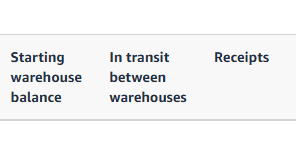
Go to the final page of the report and check the number listed under Receipts This figure shows how many units have been delivered to Amazon for that ASIN on that shipment
Compare with sales data
In Seller Central, go to Orders > Manage Orders, search for the same ASIN, and check how many units have been sold.
Identify discrepancies
In an ideal scenario, the number of units sold should match the number received. If the sales figure is lower, you’ve likely lost inventory somewhere in Amazon’s system without it being flagged or reimbursed.
I usually run this check whenever I clear an item from my inventory, once it’s sold out, I compare the received quantity against the total sold to make sure everything adds up.
What to Do When a Discrepancy is Present
If you identify a mismatch between the number of units received and the number sold, you should open a case with Amazon immediately.
When opening the case:
- Include all relevant details from the fulfilment report (linked earlier in this blog).
- Provide the FNSKU, ASIN, and any other key details shown in the report.
- Clearly state:
- How many units were sent in
- How many units were sold
- How many units appear to be missing
Once your case is submitted, log it in a spreadsheet with the case ID so you can track its progress and follow up if necessary.
Amazon will review the case, and if the evidence is clear, they should reimburse you for the missing units. Make sure you stay persistent until you get your reimbursement!

Final Thoughts
Inventory management isn’t just about keeping products in stock, it’s also about ensuring you’re not silently losing units without noticing. This particular leak is sneaky because there’s no obvious alert from Amazon when it happens, and unless you’re actively checking, it can go completely undetected.
The best approach is to build this check into your regular business processes. Whenever you clear an ASIN from your inventory, run the comparison between the received quantity and the number sold. It’s a bit of manual work, but the potential reimbursements and recovered profit make it well worth the effort.
Like most of the Business Leaks we’ve covered, the key is vigilance. If you track it, you can fix it, and every unit recovered is profit back in your pocket.